Knowledge Graph
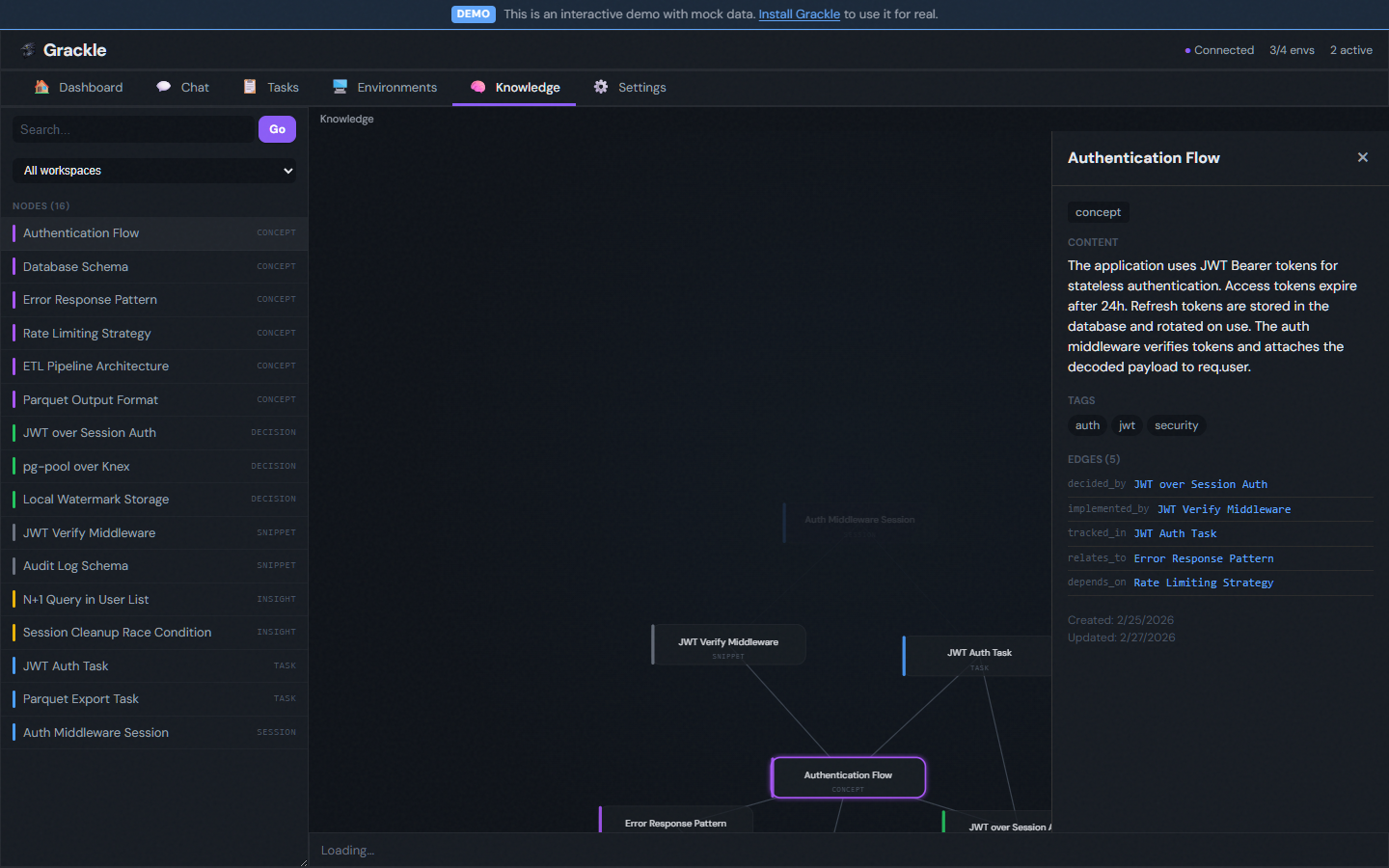
Grackle's knowledge graph gives agents a shared semantic memory backed by Neo4j. Agents write observations, decisions, and discoveries to the graph. Other agents query it by concept — not keyword — and get back connected knowledge with context.
Why a graph?
Flat finding lists work for small teams, but as agents accumulate knowledge, you need relationships. A graph lets you ask "what do we know about the auth module?" and get back the architectural decision that changed it, the bug that was found in it, the dependency that constrains it, and the task that implemented it — all connected.
Setup
The knowledge graph requires a running Neo4j instance and an opt-in environment variable.
1. Start Neo4j
# Docker (quickest)
docker run -d --name neo4j \
  -p 7687:7687 -p 7474:7474 \
  -e NEO4J_AUTH=neo4j/grackle-dev \
  neo4j:5
2. Configure Grackle
Set these environment variables before starting the server:
GRACKLE_KNOWLEDGE_ENABLED=true
NEO4J_URI=bolt://localhost:7687
NEO4J_USERNAME=neo4j
NEO4J_PASSWORD=grackle-dev
3. Start the server
grackle serve
On startup, the knowledge plugin connects to Neo4j, creates schema constraints and indexes, and initializes the local embedding model. If Neo4j is unreachable, the plugin enters degraded mode — everything else works normally, but knowledge queries return empty results.
How it works
Two kinds of nodes
The graph stores two types of knowledge:
Reference nodes point to entities in Grackle's database — tasks, findings, sessions. They don't duplicate content; their embedding is derived from the source entity. When a task is created or a finding is posted, the entity-sync subscriber automatically creates or updates the corresponding reference node.
Native nodes are knowledge that only exists in the graph — insights, decisions, architectural observations. Agents create these explicitly via MCP tools when they discover something worth recording.
Semantic search
Every node gets a vector embedding computed by a local embedding model. When you search, Grackle computes the query embedding and finds the closest nodes by cosine similarity. This means "authentication flow" matches nodes about "JWT token validation" and "OAuth2 PKCE" even if those exact words aren't used.
Graph traversal
Once you find a relevant node, you can expand it to see connected nodes — what it relates to, what references it, what was created alongside it. This multi-hop traversal surfaces context that flat search would miss.
Agent MCP tools
When the knowledge plugin is enabled, agents get three additional MCP tools:
| Tool | Description |
|---|---|
knowledge_search | Search the graph by natural language query. Returns nodes ranked by semantic similarity. |
knowledge_get_node | Retrieve a specific node by ID, including its properties and relationships. |
knowledge_create_node | Create a native knowledge node with content, category, and optional edges to existing nodes. |
Example: agent workflow
An agent working on a task might:
- Search for existing knowledge about the area it's working on
- Expand a relevant node to understand the broader context
- Do its work
- Create a knowledge node recording an architectural decision it made
That decision is then available to every future agent via semantic search.
Web UI
The knowledge graph explorer is accessible from the sidebar. It shows:
- Search bar — Type a natural language query to find relevant nodes
- Graph view — Interactive visualization of nodes and their relationships (powered by D3)
- Detail panel — Click any node to see its full content, category, tags, and connections
Health monitoring
The knowledge plugin contributes a knowledge-health reconciliation phase that periodically checks Neo4j connectivity. This status is exposed via the server's /readyz endpoint, but knowledge health is non-blocking — the server reports ready even if Neo4j is down.