Knowledge Graph
What one agent learns, the next agent inherits. Every task it touched, every session it ran, every transcript it left behind — mirrored into a graph and waiting. Grackle has a memory. Spawn another and it lands already knowing what the last one knew.
The graph is a derived mirror of Grackle's own entities — tasks, sessions, workspaces, personas, environments, and session-transcript chunks. Nothing the agent writes; nothing for it to forge. It reads.
Search it
Agents query by concept, not keyword. Every node carries a vector embedding; a search matches on meaning. Ask about "authentication flow" and you get back nodes about "JWT token validation" and "OAuth2 PKCE" — the words never have to line up.
Two MCP tools, both read-only:
| Tool | Does |
|---|---|
knowledge_search | Search the graph by natural language. Nodes ranked by similarity. |
knowledge_get_node | Pull one node by ID — its properties and its relationships. |
knowledge_search parameters:
| Parameter | Type | Does |
|---|---|---|
query | string | Natural-language query. Required. |
limit | number | Max results. Default 10, max 50. |
workspaceId | string | Pin to one workspace. Scoped callers stay in their own. |
expand | boolean | Also return nodes connected to the hits. Default false. |
expandDepth | number | Hops to traverse when expanding. Default 1, max 5. |
knowledge_get_node takes a node id plus the same expand / expandDepth.
Expanding is how context surfaces. Find a node, walk one hop out, and the decision that changed the auth module sits next to the bug found in it and the task that implemented it.
These tools reach the graph through Grackle's MCP server. See MCP Server for the full set, and Let Claude Drive Grackle for pointing an outside agent at them.
Context arrives uninvited
An agent doesn't have to ask. When a task spawns a session, Grackle searches the graph with the task's title and description, walks one hop from the top hit, drops the task's own node, scopes to its workspace, and renders a budgeted ## Related prior work block straight into the agent's system prompt.
So the agent starts already briefed on what came before — without ever calling a tool.
This runs when the per-task injectKnowledge flag is on (default on), Neo4j is healthy, and something clears a conservative similarity floor. Tune the knobs with GRACKLE_KG_RELATED_* environment variables.
See Tasks & Sessions for what spawns the session in the first place.
Wake Neo4j
The knowledge plugin is on by default. It only needs a graph store to point at. Give it Neo4j and the mirror fills.
Start one:
docker run -d --name neo4j \
  -p 7687:7687 -p 7474:7474 \
  -e NEO4J_AUTH=neo4j/grackle-dev \
  neo4j:5
Point Grackle at it before grackle serve:
GRACKLE_NEO4J_URL=bolt://localhost:7687
GRACKLE_NEO4J_USER=neo4j
GRACKLE_NEO4J_PASSWORD=grackle-dev
GRACKLE_NEO4J_DATABASE=neo4j   # optional; defaults to "neo4j"
Then:
grackle serve
On startup the plugin connects, lays down schema constraints and indexes, loads the local embedding model, and begins projecting your entities into the graph. It populates itself — tasks, sessions, workspaces, personas, environments, and transcripts mirror in automatically. No one feeds it by hand.
To shut the whole thing off on a running install: grackle plugin disable knowledge, then restart. (GRACKLE_KNOWLEDGE_ENABLED=false only seeds the disabled state on a fresh database — once the database exists, the variable is inert and plugin state is database-authoritative.)
When the wire goes quiet
Lose Neo4j and the plugin drops to degraded mode. Everything else runs. Searches return empty, the mirror stops growing — and the moment Neo4j comes back, the graph reconverges on its own. Nothing to replay, nothing to rebuild.
That's the only time the graph reads empty. With Neo4j up, it's populated.
See it
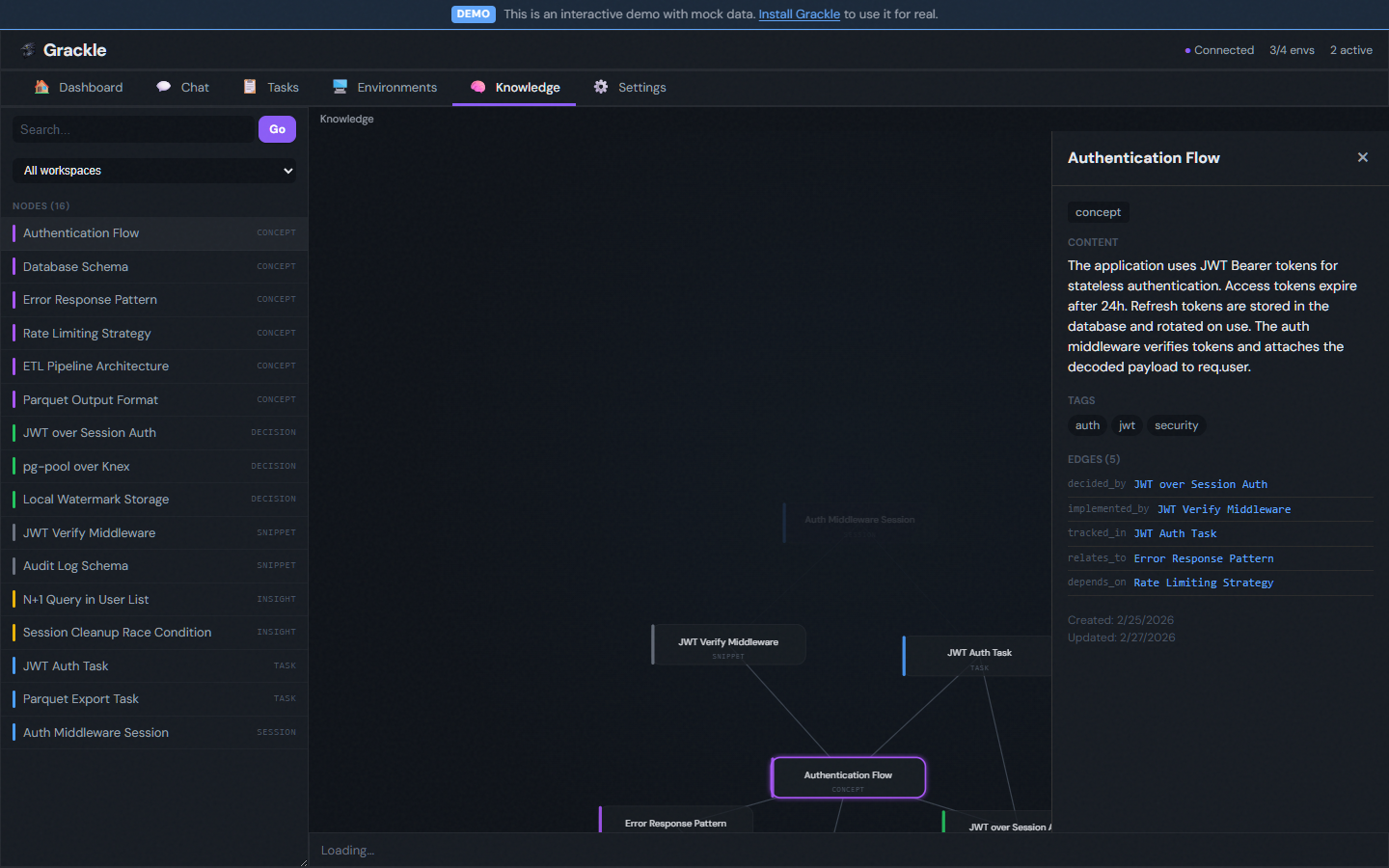
The graph explorer lives in the sidebar:
- Search bar — type a query, find the nodes.
- Graph view — a force-directed map of nodes and edges, drawn with D3-force.
- Detail panel — click a node for its full content, category, tags, and connections.
Next
- MCP Server — every tool the agents can reach.
- Tasks & Sessions — what spawns an agent and feeds it context.
- Plugins — how the knowledge plugin loads, and how to write your own.